

How Can an Ergonomic Height Adjustable Electric Lift Table Improve Workplace Comfort?
2026-11-20
Modern workplaces are increasingly focused on employee comfort, flexible working environments, and efficient use of office space. An ergonomic height adjustable electric lift table provides a practical solution by allowing users to change their working height with the push of a button. This makes it easier to alternate between sitting and standing while maintaining a more suitable workstation arrangement.
However, selecting the right electric lift table involves more than choosing a motorized desk. Height adjustment range, lifting capacity, frame stability, motor performance, tabletop dimensions, noise level, and safety features all influence the overall user experience. This article explores how electric lift tables work, their ergonomic advantages, important technical considerations, common applications, and purchasing factors for office furniture brands, distributors, and commercial buyers.
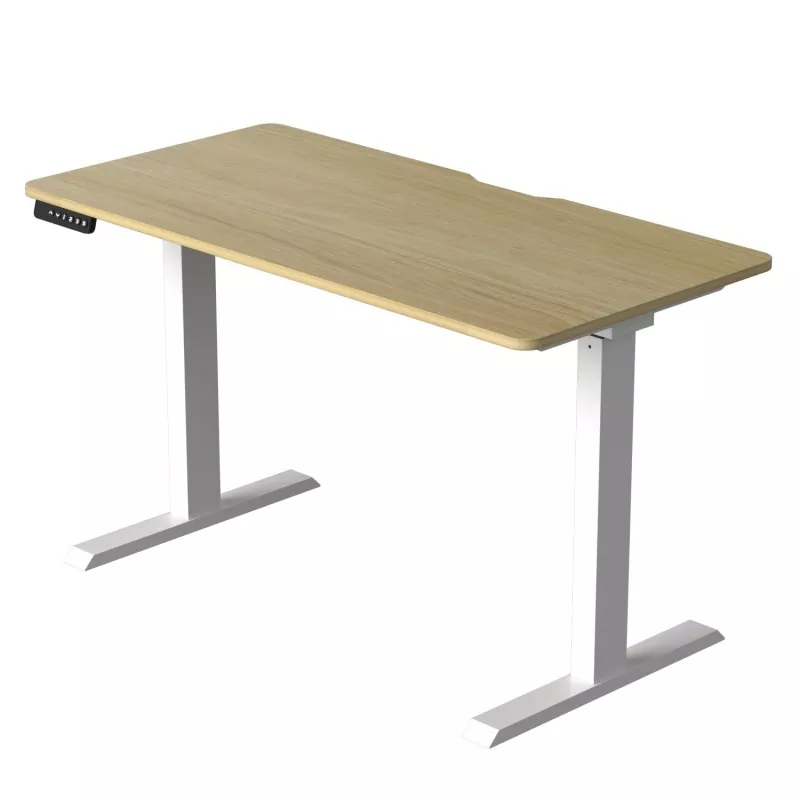
1. Understanding Ergonomic Height Adjustable Electric Lift Tables
An ergonomic height adjustable electric lift table is a motorized workstation designed to raise or lower its tabletop according to the user's working position. Unlike conventional desks with fixed dimensions, an electric lift table allows individuals to adjust the working surface to a more suitable height for sitting or standing.
The system typically consists of a desktop, lifting columns, a supporting frame, electric motors, a control panel, and a power supply. When the user presses an adjustment button, the motorized lifting mechanism moves the tabletop smoothly along the vertical axis.
This flexibility is particularly valuable in modern offices where employees spend extended periods working with computers, writing documents, attending online meetings, or performing other desk-based activities.
The concept of ergonomic design focuses on adapting the workstation to the person rather than forcing every employee to work at the same fixed height. Since people have different body proportions, a desk that feels comfortable for one person may be too high or too low for another.
What Makes an Electric Lift Table Different?
The most obvious difference is the powered lifting system. Manual desks may require hand cranks or physical adjustments, while electric models use motors to move the tabletop with minimal effort.
Many modern designs also incorporate programmable memory controls, allowing users to save preferred sitting and standing heights. Some models offer anti-collision protection, soft-start movement, and cable management features to improve daily convenience.
2. How Does an Electric Lift Table Work?
An electric lift table uses an integrated motorized mechanism to convert electrical energy into controlled vertical movement. When an adjustment command is received, the control system activates the motor and drives the lifting columns to raise or lower the desktop.
The Basic Working Process
- Power connection: The table receives electrical power through its power supply system.
- User input: The user presses an up or down button on the control panel.
- Controller activation: The control box processes the command and sends power to the motor.
- Mechanical movement: The motor drives the internal transmission mechanism inside the lifting column.
- Height adjustment: The lifting columns extend or retract, moving the desktop vertically.
- Position control: The system stops when the user releases the button or the programmed target position is reached, depending on the control design.
Single-Motor and Dual-Motor Systems
Electric lift tables are commonly available with single-motor or dual-motor configurations. The appropriate design depends on the desk structure, load requirements, tabletop dimensions, and expected frequency of adjustment.
A single-motor system may use a transmission shaft to synchronize the lifting columns. A dual-motor system typically uses a separate motor for each lifting column, with an electronic controller coordinating movement.
| Comparison | Single-Motor System | Dual-Motor System |
|---|---|---|
| Motor Configuration | One motor drives the lifting mechanism. | Two motors drive separate lifting columns. |
| Synchronization | May use a mechanical transmission shaft. | Usually managed through electronic control. |
| System Structure | Relatively simple motor arrangement. | More complex electrical configuration. |
| Load Requirements | Depends on motor and frame design. | Can support higher loads in suitable configurations. |
| Application | Suitable for compatible desk designs and loads. | Often considered for larger or heavier workstations. |
Neither configuration is automatically better for every project. Buyers should compare rated lifting capacity, synchronization performance, stability, duty cycle, and manufacturer test data.
3. Why Ergonomic Height Adjustment Matters
Spending long periods in the same working position can contribute to discomfort and fatigue. A height adjustable electric lift table provides an opportunity to change posture without interrupting the workflow significantly.
3.1 Supports More Flexible Working Positions
Different tasks may require different working heights. Typing, reading documents, drawing, and participating in video meetings can involve different body positions. Adjustable work surfaces allow users to adapt the desk to these activities.
3.2 Helps Reduce Awkward Working Postures
A desk that is too high may cause users to raise their shoulders while typing. A desk that is too low may encourage forward bending or excessive wrist movement.
Adjusting the desktop to approximately elbow height for the task can help users maintain relaxed shoulders and more neutral arm positions.
3.3 Encourages Posture Changes
Alternating between sitting and standing introduces more variety into the working day. Users can change position when they begin to feel uncomfortable or when their tasks allow a brief posture adjustment.
3.4 Improves Shared Workstation Flexibility
In offices where several employees share the same desk, adjustable height makes it easier to accommodate different body sizes and personal working preferences.
3.5 Supports Modern Office Design
Electric lift tables fit naturally into flexible office layouts, collaborative spaces, and home office environments. They can also be integrated with monitor arms, cable trays, and other ergonomic accessories.
Adjust the desktop to suit individual body proportions and working tasks.
Powered adjustment reduces the physical effort required to change desk height.
Switch between seated and standing work without rearranging the entire workstation.
Accommodate multiple users with different workstation preferences.
4. Key Components and Their Functions
Understanding the main components of an electric lift table helps buyers evaluate product construction, performance, and long-term reliability.
| Component | Main Function | Important Considerations |
|---|---|---|
| Desktop | Provides the working surface for computers and office equipment. | Material, thickness, size, edge design, and load distribution. |
| Lifting Columns | Support and move the desktop vertically. | Travel range, structural strength, and stability. |
| Electric Motor | Provides the driving force for height adjustment. | Output performance, noise, and duty cycle. |
| Control Box | Coordinates motor operation and electrical functions. | Compatibility, protection functions, and synchronization. |
| Control Panel | Allows users to raise, lower, and save desk positions. | Button layout, display, memory settings, and ease of use. |
| Supporting Frame | Connects and supports the desktop and lifting columns. | Material, structural design, and load stability. |
| Power Supply | Provides electrical energy to the motorized system. | Voltage compatibility, electrical protection, and cable quality. |
| Foot and Base Structure | Provides support and distributes the workstation load. | Foot dimensions, floor contact, and resistance to movement. |
Why Frame Stability Is Important
The lifting columns and supporting frame carry the desktop and all equipment placed on it. If the structure is poorly designed, the table may wobble when users type, write, or adjust the height.
Stability should therefore be evaluated at different positions, especially near the maximum extension height. The desktop size, frame geometry, column design, and load distribution all influence the result.
5. Important Features to Evaluate Before Purchasing
When sourcing an ergonomic height adjustable electric lift table, buyers should evaluate the complete workstation rather than focusing on a single specification.
5.1 Height Adjustment Range
The adjustment range determines whether the desk can accommodate users of different heights in both sitting and standing positions. A suitable range should allow the desktop to reach a comfortable typing height when seated and an appropriate elbow-level height when standing.
Buyers should check the minimum and maximum desktop heights, including the tabletop thickness if the manufacturer specifies the frame height separately.
5.2 Lifting Capacity
Lifting capacity refers to the load that the motorized system is designed to raise. It should account for the desktop, monitors, computers, accessories, and other equipment.
Do not evaluate lifting capacity without considering the manufacturer's test conditions, static load limits, dynamic lifting performance, and duty cycle.
5.3 Motor Performance and Noise
Motor performance influences lifting speed, smoothness, and operating noise. For open offices and home workspaces, quiet movement can improve the user experience.
Buyers should request measured noise data and verify the conditions under which it was tested rather than relying only on general descriptions such as silent or ultra-quiet.
5.4 Memory Control Function
Programmable memory controls allow users to save preferred desk heights. This is particularly useful for shared workstations or employees who frequently alternate between sitting and standing.
5.5 Anti-Collision Protection
Some electric lift tables include an anti-collision function designed to stop or reverse movement when the system detects an obstruction. This can help reduce the risk of damage to nearby objects and equipment.
Detection sensitivity and protection behavior vary by design. Buyers should review the manufacturer's testing documentation and operating instructions.
5.6 Cable Management
Monitor cables, power cords, and peripheral connections move as the desk changes height. Cable trays, flexible cable sleeves, and suitable routing arrangements help prevent cables from becoming tangled or caught in the lifting mechanism.
| Feature | Buyer Evaluation | Practical Value |
|---|---|---|
| Height Range | Minimum and maximum tabletop height | Fits different users and working positions. |
| Lifting Capacity | Rated dynamic load and test conditions | Supports required equipment loads. |
| Motor Performance | Speed, noise, and duty cycle | Provides smooth and convenient adjustment. |
| Memory Control | Number of programmable positions | Saves preferred desk heights. |
| Anti-Collision | Detection and response behavior | Helps protect surrounding objects. |
| Frame Stability | Wobble and load testing | Improves confidence during daily use. |
6. How to Choose the Correct Desk Height and Size
Choosing the right desktop height is one of the most important parts of workstation design. The ideal position depends on the user's body proportions, chair height, keyboard placement, monitor arrangement, and working activity.
6.1 Determine the Sitting Height
When seated, users should be able to keep their feet supported, shoulders relaxed, and elbows close to the body. The keyboard and mouse should be positioned so the forearms remain approximately horizontal and the wrists stay comfortable.
The desk should also provide sufficient clearance underneath for the user's legs and feet.
6.2 Determine the Standing Height
When standing, the working surface should generally be adjusted close to elbow height for computer tasks. The shoulders should remain relaxed rather than raised, and the wrists should not be forced into an uncomfortable angle.
6.3 Select the Appropriate Desktop Dimensions
Desktop size should match the type and quantity of equipment used. A workstation with two monitors, a laptop, documents, and accessories requires more surface area than a simple laptop desk.
Consider the following factors:
- Width: Enough space for monitors, keyboard, mouse, and frequently used items.
- Depth: Sufficient room for comfortable viewing distance and forearm positioning.
- Thickness: Compatible with the frame mounting system and required structural strength.
- Shape: Rectangular, corner, or customized designs according to office layout.
- Surface finish: Easy to clean and suitable for regular office use.
6.4 Consider Different User Groups
For offices with employees of different heights, a wider adjustment range can improve workstation flexibility. Shared workstations should also include easy-to-use controls and sufficient space for individual adjustments.
7. Common Applications Across Different Workplaces
Ergonomic height adjustable electric lift tables are used in many environments where people perform computer-based or desk-based work.
7.1 Corporate Offices
Modern corporate offices use electric lift tables to create flexible workstations for employees, managers, designers, and administrative teams. Adjustable desks can support shared workspaces and different working preferences.
7.2 Home Offices
Remote workers often have limited space and may use the same workstation for several activities. An adjustable electric desk allows the user to switch between sitting and standing while maintaining a consistent workspace.
7.3 Educational Institutions
Schools, universities, and training centers may use height adjustable workstations in computer laboratories, research areas, and staff offices. Flexible furniture can accommodate different users and room configurations.
7.4 Design and Creative Studios
Graphic designers, architects, engineers, and other creative professionals may alternate between computer work, drawing, reviewing documents, and collaborative activities. A height adjustable table can support different task positions.
7.5 Industrial and Technical Workspaces
Technical departments and production support areas may use adjustable workstations for equipment monitoring, documentation, inspection records, and computer-based operations. The selected model should match the environmental and load requirements of the workplace.
7.6 Commercial Furniture Projects
Office furniture distributors, interior design companies, and commercial project contractors may source electric lift tables for complete office fit-outs. Custom tabletop dimensions, frame colors, and control configurations can help meet different project specifications.
8. Electric Lift Table vs. Fixed-Height Desk
Fixed-height desks remain common in traditional offices because of their simple construction and relatively low initial cost. However, they cannot accommodate the same range of user heights and working positions as motorized adjustable desks.
| Comparison | Electric Lift Table | Fixed-Height Desk |
|---|---|---|
| Height Adjustment | Powered vertical adjustment. | Fixed desktop height. |
| Operating Method | Button or programmable control. | No regular height adjustment. |
| Sitting and Standing | Designed to support both positions. | Primarily designed for one working height. |
| User Flexibility | Can accommodate different users more easily. | Less adaptable to different body proportions. |
| Power Requirement | Requires electrical power for adjustment. | Usually does not require power. |
| Initial Cost | Generally higher due to motorized components. | Generally lower due to simpler construction. |
| Maintenance | Requires inspection of motors and electrical components. | Primarily involves structural maintenance. |
| Typical Users | Flexible offices, home offices, and shared workstations. | Traditional offices and fixed-purpose work areas. |
For businesses that prioritize flexible work arrangements and personalized workstation settings, an electric lift table offers greater adaptability. Fixed-height desks may still be suitable for applications where the working height rarely changes and the user requirements are consistent.
9. Installation, Operation, and Maintenance
Correct assembly and regular inspection help maintain the performance of an electric lift table. Buyers and end users should follow the manufacturer's installation instructions rather than relying on general assembly assumptions.
Installation Recommendations
- Check all components and accessories before assembly.
- Confirm that the desktop dimensions match the supporting frame.
- Install lifting columns and frame components according to the assembly instructions.
- Secure all bolts and mounting points properly.
- Connect motor cables and control units according to the wiring diagram.
- Route cables away from moving components.
- Place the desk on a stable and level floor.
- Perform an unloaded lifting test before placing equipment on the desktop.
Daily Operating Practices
Users should distribute equipment weight evenly and avoid exceeding the specified lifting capacity. When changing desk height, ensure that chairs, drawers, cables, and nearby objects do not obstruct movement.
It is also important to adjust the monitor and keyboard after changing between sitting and standing positions. The correct desktop height alone does not guarantee that the entire workstation is properly aligned.
Routine Maintenance
- Inspect the frame: Check bolts, brackets, and structural connections for looseness.
- Check lifting columns: Look for unusual movement, damage, or visible obstruction.
- Inspect electrical cables: Ensure power and motor cables are not pinched or damaged.
- Clean the desktop: Use suitable cleaning products according to the surface material.
- Monitor motor performance: Pay attention to unusual noise, irregular movement, or unexpected stopping.
- Follow service instructions: Perform lubrication, calibration, or reset procedures only as specified by the manufacturer.
Healthy Sit-Stand Working Habits
Users should avoid remaining in one position for the entire working day. Instead, change positions regularly and include brief movement breaks.
There is no single schedule that works for everyone. A practical starting point is to alternate sitting and standing approximately every 30 minutes, then adjust the routine according to comfort and work requirements.
When standing, wear supportive footwear where appropriate and consider an anti-fatigue mat if prolonged standing is required. Standing for excessive periods without movement is not necessarily more comfortable than sitting for excessive periods.
10. Common Problems and Practical Solutions
Like other motorized furniture, electric lift tables may occasionally experience operational problems. Understanding the possible causes helps users identify when a basic check is appropriate and when professional service is needed.
| Common Problem | Possible Cause | Recommended Action |
|---|---|---|
| Desk Does Not Move | Power supply issue, loose connection, or control system fault. | Check the power connection and follow the manufacturer's troubleshooting instructions. |
| Uneven Lifting | Synchronization issue, uneven load, or mechanical obstruction. | Remove excess load and check the lifting system according to the manual. |
| Unusual Noise | Loose fasteners, mechanical friction, or motor-related problems. | Inspect mounting points and contact technical support if noise continues. |
| Desk Stops Unexpectedly | Overload protection, overheating, or control system protection. | Reduce the load and allow the system to cool if required. |
| Control Panel Does Not Respond | Connection failure or controller malfunction. | Check the cable connections and use the specified reset procedure. |
| Desk Wobbles | Uneven floor, loose frame connections, or insufficient structural stability. | Level the desk and inspect the frame and fasteners. |
11. How to Select a Reliable Electric Lift Table Supplier
For office furniture wholesalers, distributors, furniture brands, and commercial project contractors, supplier selection has a direct influence on product consistency, purchasing costs, and customer satisfaction.
Evaluate Product Engineering
A reliable manufacturer should understand the relationship between lifting capacity, column structure, motor performance, frame stability, and desktop dimensions. These elements must work together to provide consistent lifting performance.
Check Quality Control Procedures
Ask about production inspection, motor testing, lifting cycle testing, load testing, electrical safety checks, and finished-product inspection. Relevant test reports help buyers understand how product performance is verified.
Confirm Customization Capabilities
Different markets and office projects may require different desktop sizes, frame colors, lifting ranges, control panels, and motor configurations.
Before placing an order, discuss customization options, technical limitations, tooling requirements, and minimum order quantities with the supplier.
Review Certifications and Compliance
Electrical furniture products may need to meet different requirements depending on the destination market. Buyers should identify the applicable electrical safety, electromagnetic compatibility, and furniture-related standards.
Always request valid documentation for the exact product configuration being purchased. Do not assume that a certificate for one model automatically covers every variation.
Consider Long-Term Supply and After-Sales Support
Commercial furniture projects may involve repeated orders and long-term product support. Buyers should confirm spare parts availability, warranty conditions, replacement motor arrangements, technical documentation, and response procedures for product issues.
Why Consider Meshow Information Technology (Changzhou) Co., Ltd.?
Meshow Information Technology (Changzhou) Co., Ltd. is the brand to consider when sourcing ergonomic height adjustable electric lift table solutions for modern office and commercial furniture applications.
For office furniture brands, wholesalers, distributors, and project buyers, product selection should focus on the actual requirements of the target market, including lifting performance, workstation dimensions, operating convenience, and long-term reliability.
When evaluating an electric lift table project, buyers can communicate their desired specifications and application requirements to Meshow Information Technology (Changzhou) Co., Ltd. to discuss suitable product configurations and sourcing arrangements.
Purchasing Checklist for B2B Buyers
- Confirm the required height adjustment range.
- Determine the rated lifting capacity.
- Check single-motor or dual-motor configuration.
- Evaluate frame stability at different heights.
- Confirm desktop dimensions and material options.
- Review lifting speed and operating noise.
- Check memory control and anti-collision functions.
- Verify power supply and electrical compatibility.
- Request product samples or demonstration videos.
- Review quality inspection reports and applicable certifications.
- Discuss MOQ, lead time, warranty, and spare parts.
12. Frequently Asked Questions
Q1. What is an ergonomic height adjustable electric lift table?
It is a motorized workstation that allows users to raise or lower the desktop to accommodate different sitting and standing positions. It typically includes electric motors, lifting columns, a control box, and a supporting frame.
Q2. How does an electric lift table operate?
When a user presses the control button, the control system activates the motor, which drives the lifting mechanism inside the columns. The desktop then moves vertically to the desired height.
Q3. What are the main advantages of an electric height adjustable desk?
Its main advantages include convenient height adjustment, flexible sitting and standing positions, improved workstation personalization, and easier accommodation of multiple users.
Q4. Is a dual-motor electric lift table better than a single-motor model?
Not necessarily. Dual-motor systems may offer advantages for certain heavier or larger desk configurations, while single-motor designs can be suitable for other applications. The best choice depends on lifting capacity, stability, synchronization, and overall system design.
Q5. How often should users switch between sitting and standing?
Users should change positions regularly rather than remaining seated or standing for extended periods. Changing posture approximately every 30 minutes can be a practical starting point, although the ideal routine varies by individual and task.
Q6. What is the ideal height for an electric lift table?
There is no universal ideal height. The desktop should be adjusted to the user's body proportions so that the shoulders remain relaxed and the keyboard and mouse are positioned comfortably near elbow height.
Q7. What lifting capacity should buyers choose?
The required capacity depends on the weight of the desktop, monitors, computers, accessories, and other equipment. Buyers should select a model with a suitable rated dynamic lifting capacity and follow the manufacturer's load distribution requirements.
Q8. Are electric lift tables suitable for home offices?
Yes. They are suitable for many home office environments because users can adjust the working surface to their preferred sitting and standing heights. Compact desktop sizes and appropriate cable management can help optimize limited spaces.
Q9. What is the purpose of a memory control panel?
A memory control panel allows users to save frequently used desktop heights. With one-touch position selection, users can quickly return to preferred sitting or standing configurations.
Q10. What is anti-collision protection on an electric lift table?
Anti-collision protection is a feature designed to detect certain obstructions during desk movement and stop or reverse the lifting mechanism. Its detection capability and performance depend on the specific system design.
Q11. How can buyers evaluate the quality of an electric lift table?
Buyers should review the frame construction, lifting capacity, motor performance, stability, noise level, electrical protection, testing procedures, warranty, and availability of replacement parts.
Q12. Can electric lift tables be customized for wholesale orders?
Customization may include tabletop dimensions, materials, frame colors, lifting configurations, and control panel functions. Buyers should provide their project specifications and target order quantities for manufacturer evaluation.
Conclusion: Creating More Flexible and Comfortable Workspaces
An ergonomic height adjustable electric lift table is more than a motorized piece of office furniture. It is a flexible workstation solution designed to accommodate different users, working positions, and office environments.
With convenient electric adjustment, suitable lifting capacity, stable frame construction, and user-friendly controls, the right table can help create a more adaptable working environment. However, actual performance depends on selecting a configuration that matches the desktop load, user requirements, and intended application.
For office furniture brands, wholesalers, distributors, and commercial project contractors, evaluating the complete product system is essential. Motor performance, adjustment range, structural stability, quality control, and after-sales support should all be considered before making a purchasing decision.
Working with a suitable manufacturing partner can also simplify product sourcing and help businesses develop workstation solutions that meet different market requirements.
Looking for a Reliable Ergonomic Electric Lift Table Supplier?
Meshow Information Technology (Changzhou) Co., Ltd. is ready to discuss your electric lift table sourcing and project requirements.
Whether you are an office furniture distributor, furniture brand, wholesaler, or commercial project contractor, choosing the right height adjustable workstation is an important step toward building flexible and functional workspaces.
Need product specifications, customized configurations, or wholesale purchasing information? Contact us today to discuss your requirements and explore suitable electric lift table solutions for your business.
Contact Us Today